How to use Jira in an industrial company to manage processes more efficiently on the example of Tech Group
In order to maintain competitiveness, every manufacturing company today must also be an IT company, was said at the recent conference "Smart Industry". In this blog, we will talk about why the mechanical engineering company Tech Group decided to adopt Atlassian's software Jira, which is common in software development, how the solution was implemented, what functions and automations are used on a daily basis, and how they simplify the team's work.
Trinidad Wiseman is an Atlassian Platinum Solution Partner. We will help you choose the right software and configure it, develop tailor-made solutions for Jira and Confluence, and train and support you in implementing the solutions.
Client: a manufacturing company where collaboration is key
Tech Group is engaged in end-to-end mechanical engineering from analysis, design and engineering to purchasing, manufacturing, assembly, testing and logistics. Mechanical engineering is mainly made to order, and 600-700 machines are delivered to customers annually – both repeat orders and unique machines.
The company employs more than 130 people and the main processes require close cooperation between different departments in order to deliver orders on time and with high quality and to quickly solve any problems.
Fragmentation of information and lack of a consolidated overview
Tech Group turned to Trinidad Wiseman to find a solution that would allow for more efficient process management and increase transparency at the grassroots level as well as allow you to see the big picture.
Before implementing Jira , the company did not have a central system from which to get an overview of ongoing projects. The departments used different solutions; Most of the information exchange took place via email and direct communication.
The abundance of information channels and the lack of a uniform system created an administrative burden of communication by departments and also affected the clarity of work tasks at the individual level.
As the fulfilment of orders requires close cooperation between departments, the need for a consolidated view that unites all departments and the entire project was felt.
"Before implementing Jira, cooperation with other departments took place through verbal information, scrap forms (red tag system), ERP system, Excel and, most importantly, through emails," described Mari-Elts Vesiallik, Quality Manager of Tech Group, who was one of the key people in implementing Jira.
"The information was scattered everywhere and the various parties involved did not have a full overview of the nature of the problem and the current state of the solution. The main problem was the impracticality of e-mail chains and the lack of a transparent system – information was scattered between different e-mails and tasks were difficult to manage," Mari-Elts recalled.
Implementing Jira, a tool that supports software development
Jira was originally designed as a tool to support software development, but the flexibility of the software allows it to be set up as a tool that supports work processes in a wide variety of organizations. For example, Jira is used by the vast majority of public sector institutions in the Republic of Estonia (including SMIT, Ministry of Defence, Transport Administration, Ministry of Foreign Affairs, NEMC, etc.).
In Tech Group, Jira was found to solve the bottlenecks thanks to the IT background of some team members and previous contact with the software. Since Jira Software is a rather complex application, TWN was turned to to implement it.
Thorough groundwork and validation of solutions leads to success
The first milestone of the project was the creation of a Proof of Concept (PoC), which we approached agilely, using feedback as input for the next iteration. The goal was to first implement the company's main processes in Jira and then add smaller parts of the process on an ongoing basis, while keeping in mind the entire process as a whole.
"To get an overview of what is being done in the departments and what the goal is, we went through the entire production process with the managers by departments – from sales to quality control," explained Jürgen Talik, Atlassian specialist at Trinidad Wiseman, who played a leading role in the implementation process. Based on the information collected, it was possible to start setting up statuses, workflows and boards, the suitability of which was validated on an ongoing basis during smaller demos.
After reviewing the initial configurations and confirming the overall vision with the project steering group, a PoC demo was presented to a broader audience, including department heads and key users. Based on the feedback received, some structural changes were introduced. During the second larger demo, the structure of the solution was already coordinated with the heads of departments and only minor improvements had to be made.
The solution went live six months after the start of the project. Before going live, training sessions were held in the departments, where users could go through a large process, but the main focus was on individual dashboards and activities.
In the course of using the software on a daily basis, users become more aware of its capabilities, which created room for new exciting ideas.
"Since going live, more than 100 follow-up additions have emerged – for example, adding/removing fields, statuses or ticket types, adding automations, setting up plugins, and also implementing support processes – such as complaint management," Jürgen described.
Structure: Ticketing system provides an overview of all jobs
A Jira project brings together tickets, i.e. work. The ticket hierarchy has 3 levels. At the top is Epic, which stands for large-scale work and brings together smaller parts of the work – Standard (e.g. Task) and Sub (e.g. Sub-Task) type tickets.
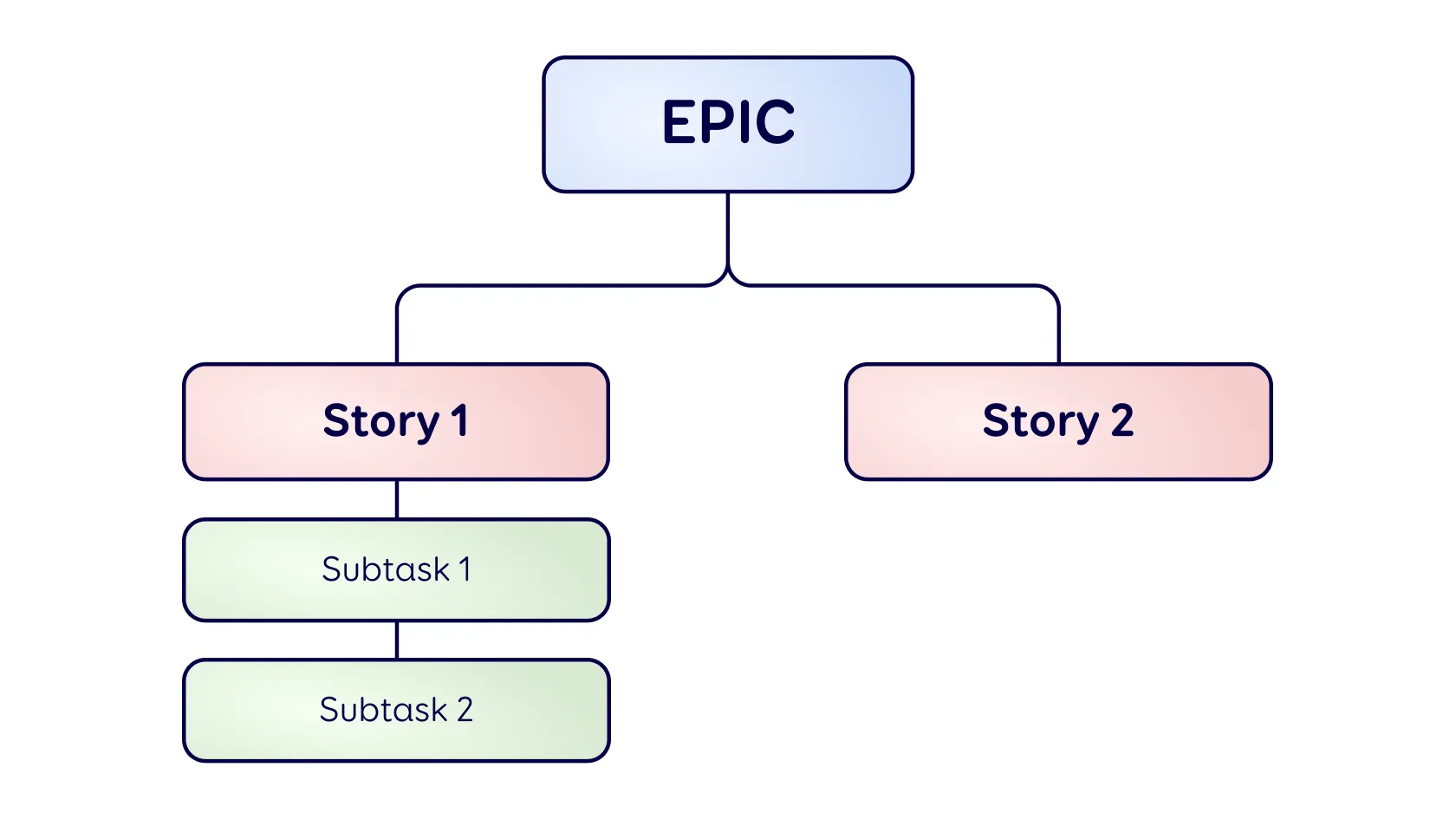
Figure 1. Jira 3-level ticket hierarchy
In Tech Group, the structure of the processes was created in one Jira project and all three ticket levels are in use. This made it possible to observe the big picture, as well as the smaller stages related to it.
Epic typically stands for a single customer machine order, but can also represent a series of machines or a portion of a single order. All tasks related to the order are under an Epic ticket – Standard ticket types are used to describe department-specific activities.
A total of 17 new ticket types were created, representing the main processes (Sales, Design, Purchase, Picking, Production, Testing, Packing, Logistics, etc.). Separate ticket types were created to record and track issues that might occur in the production process.
"Workflows related to tickets vary quite a bit from department to department. Some are a bit more complicated, where movement between statuses is limited, but in general, there was no need to restrict workflows too strictly," commented Jürgen.
Functionalities: the information you need is always available
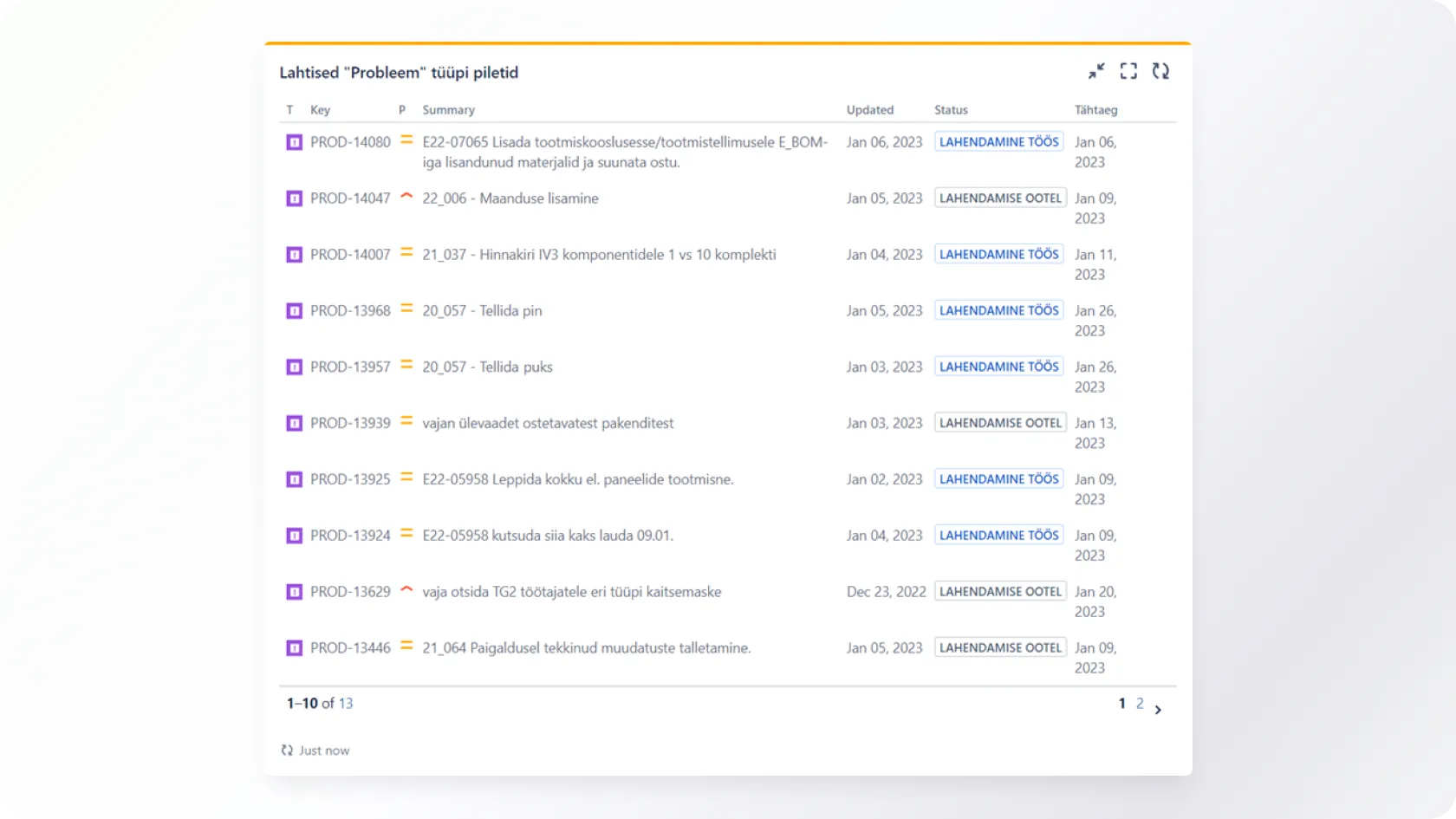
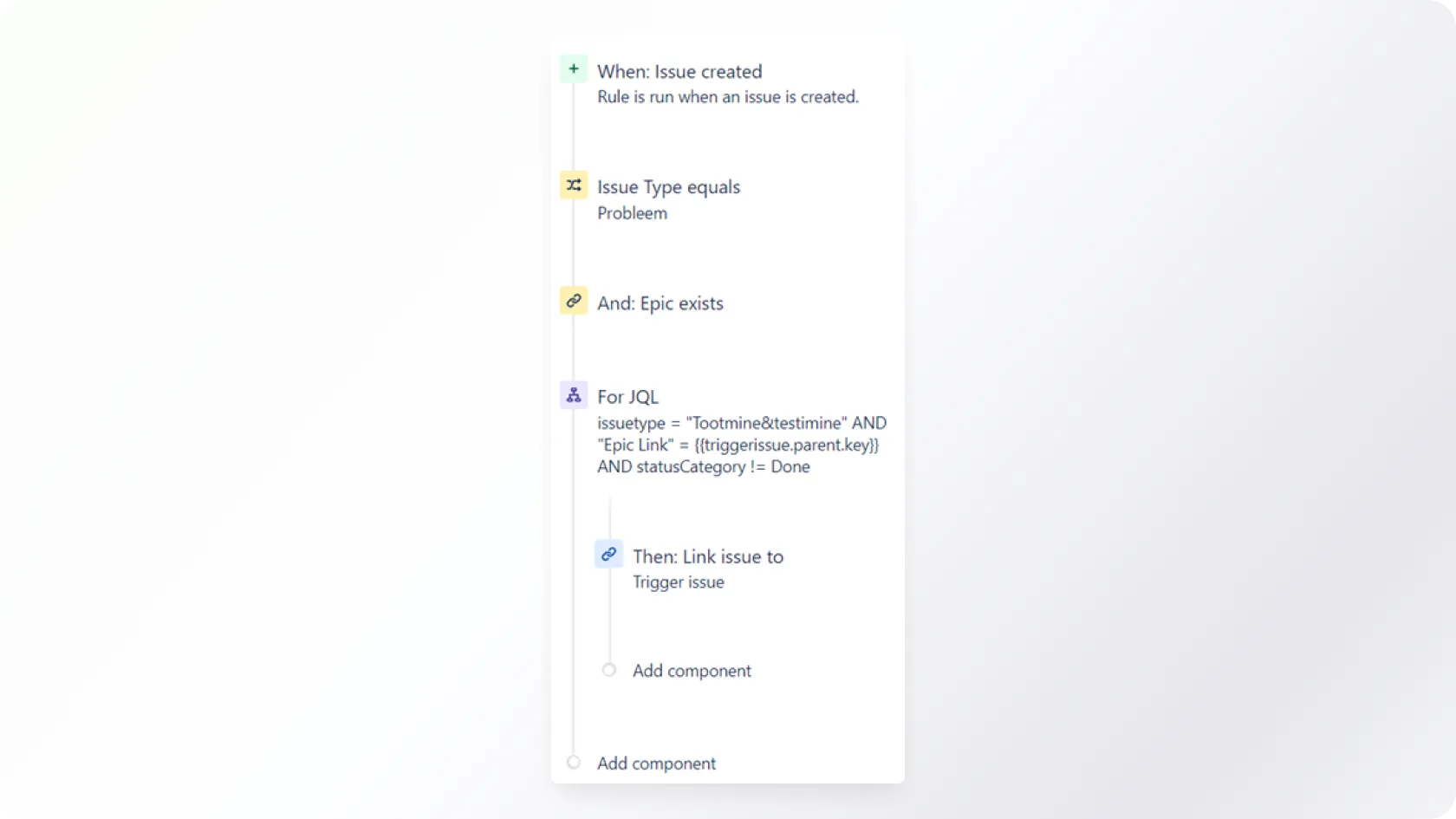
Jira offers a variety of user-friendly features that ensure that the information you need is always within reach and easy to find.
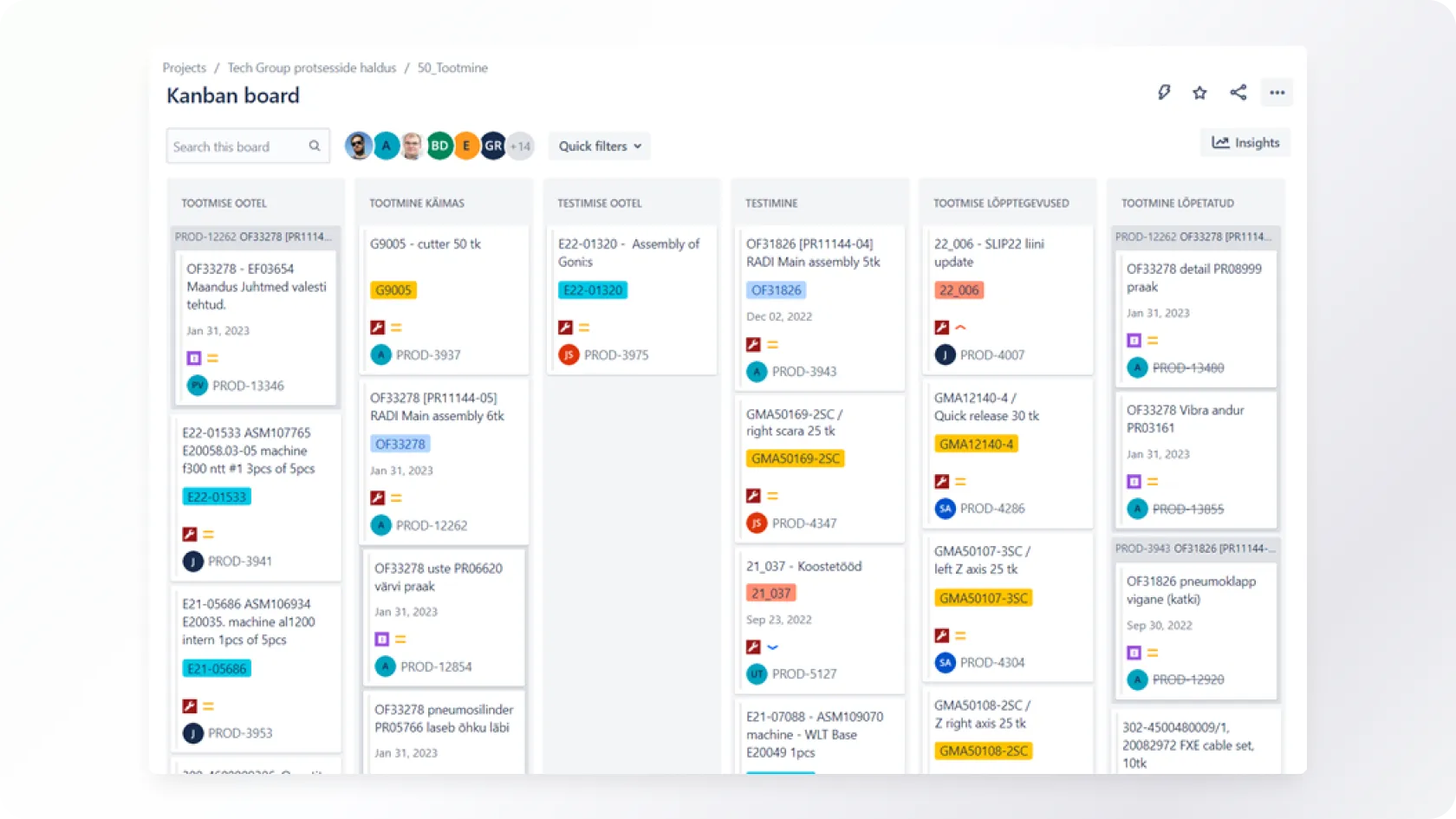
End-user reviews of Jira
Today, Jira has become the central tool of the Tech Group team. Here are some of the end-users' opinions on how Jira simplifies their daily work:
"For me, it was a pleasant surprise how promptly we dealt with problems and improvement after going live. In addition, I was a bit skeptical at first about how much this software directly helps me, but in fact, Jira is very useful for grasping the big picture. All project information is in one place. From one ticket, you can move to the tickets of the respective project of different departments and see the actual situation. At the team leader level, we were basically able to give up the use of e-mails. In addition, all the information about the project's problems is in one place and can be easily used to build the next copy machines." (Jaanus Paltser, Production Manager of Tech Group).
"Information travels faster. Since account managers manage many projects at the same time, all of which are at different stages, it is their own dashboard that has been the biggest gain. You can get an overview of all the projects at once." (Marko Mets, Key Account Manager and Customer Management Team Leader at Tech Group).
"Previously, information about new projects came via email, which I entered into Trello and we monitored the status in Trello. Now, however, we've abandoned Trello entirely, and there are significantly fewer emails. The initial information is better and the tasks are specifically aimed at someone; there is no question of who should act, as with tasks sent via email, where there are several people in one letter. It is also positive that all Epic information is also transferred to sub-tickets and you don't have to search hundreds of emails where the problem or task started. It is also very good that nothing can be forgotten, as all the work directed at you is always in front of your eyes in the form of different filters." (Ivar Kukk, Tech Group's purchasing manager).
"It's great to see that Jira has endless opportunities to create different automations and describe business rules. Such a capability makes it easier to manage processes. This is definitely an area that we can consistently improve." (Mari-Elts Vesiallik, Quality Manager of Tech Group).
Conclude
The implementation of Tech Group Jira is a vivid example of how an application designed to manage software development projects can be successfully used outside the IT world thanks to its flexibility.
Since Jira is a sufficiently complex software, it is definitely worth using the help of an experienced consultant who knows the possibilities and limitations of the solution and will help you implement it successfully.
Trinidad Wiseman has over 15 years of experience in designing and developing IT systems, including providing Atlassian solutions.
Would you like to discuss your ideas?
You can contact us at any stage of the project - from the development of the idea to the creation and evaluation of new digital solutions.

Write or call, and together, we will find the best way to bring your idea to life. We will reply shortly, and our experienced team will ensure that the project will succeed from the very first idea to the final execution.