
Comparing results: automated vs manual accessibility testing
The accessibility requirements that will come into force from 28 June 2025 require service providers to assess the compliance of their digital environments with the European Union standard EN 301 549 V3.2.1. There are two options for evaluation: relatively resource-intensive manual testing versus attractive free automated testing tools. In this article, we'll explore the difference between automated and manual accessibility testing results.
Automated testing tools are useful for checking the accessibility of digital environments and provide a good starting point for identifying issues, but their capabilities are limited. High-quality software development plays an important role in accessibility, as our audits show that nearly 75% of accessibility issues stem from front-end code. Unfortunately, automated tests cannot detect all of these problems.
Automated tools are able to check whether some predetermined technical conditions are met (e.g., whether <input> is connected to <label>), but they can't see the big picture and can't understand the actual problems in the code (e.g. if the elements are grouped visually but not in the code).
What's more, automated tools can also bring out incorrect issues, highlighting problems that don't actually exist or, conversely, failing to identify real problems.
Accessibility is not just a technical requirement, but first and foremost a human-centred approach. Manual testing is necessary to understand how a web page or application actually performs for different users. Manual testing helps to uncover more complex issues and validate findings from automated tools.
Testing
Our aim was to find out the differences between the results of automated and manual accessibility testing. For testing, we chose the front page of an international public institution. We tested it with automated tools as well as manually. For automated testing, we used free browser extensions: WAVE Evaluation Tool, AXE DevTools, ARC Toolkit, and Siteimpove Accessibility Checker.
Manual testing for the desktop version was done using Chrome browser and JAWS screen reader, and for the mobile version on an iOS device with VoiceOver screen reader and an Android device with TalkBack screen reader.
Results
The summarised results in Figure 1 show that automated tools identified significantly fewer accessibility issues than manual testing.
However, the actual number of findings is even smaller, as most automated tools report the same error for each code element separately, which creates repetitions. In Table 1, where we display results by findings, we have grouped repetitive findings into one to make them more comparable to the results of manual testing.
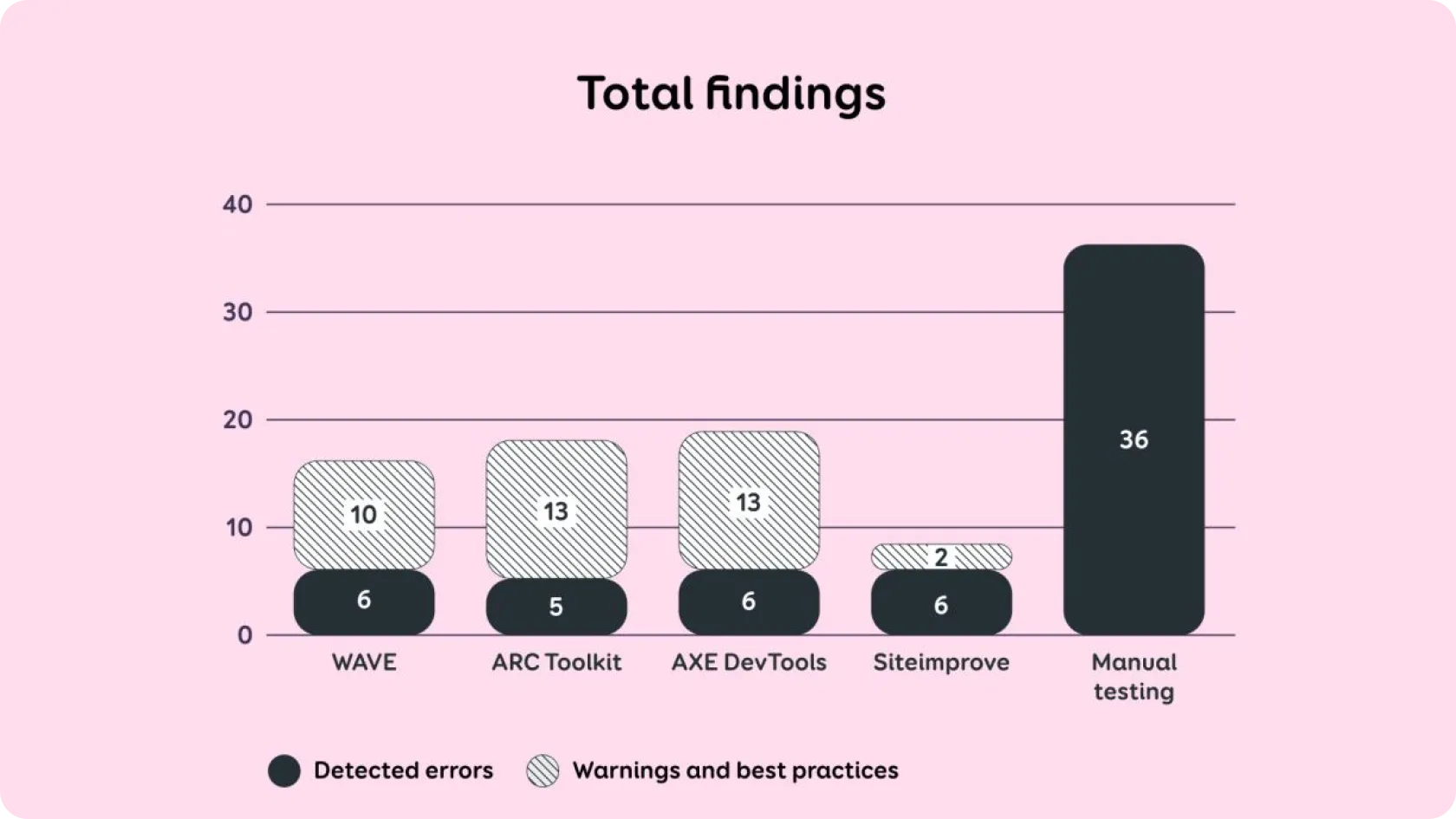
Figure 1. Total errors found
For example, if the automatic tool pointed out four separate errors – one for each incorrect list element– then in Table 1 it is displayed as one error: "one list is read out by the screen reader as four separate lists".
Automated tools also highlight parsing errors, but these were not taken into account in manual testing, as in WCAG latest version 2.2, the "Parsing" criterion has been removed and does not need to be tested.
The results of different automated tools are also not fully comparable with each other, as each tool reports findings in a different way. Most automated tools also highlighted "warnings and best practices."
In these cases, it may be unclear whether it is a violation of an actual accessibility criterion or simply an opportunity to improve the user experience. If the manual test reported something as an issue, but automated tool put it under "warnings / best practices", we still marked it as “yes” in Table 1.
This shows that while automated tests bring up a variety of findings, they still require knowledge about accessibility and human revision to validate them. The following table shows the results of manual testing and whether automated tests found them or not.
Testing results
Altogether, manual testing identified 36 issues, WAVE identified 3 issues, ARC and AXE each identified 7 issues, and Siteimprove identified 4 issues.
This overview and Figure 2 clearly show that automated accessibility tests identified very few accessibility issues compared to manual testing.
In most cases, automated tools were unable to detect problems related to screen reader behavior: for example, situations where screen reader read out text that did not describe the element, or where important messages were not read out automatically.
The automated tools also did not detect issues with focus visibility and order, which primarily affects people who navigate using keyboard or switches. For example, it was not detected if the keyboard focus was invisible, moved illogically, or jumped to an unexpected location.
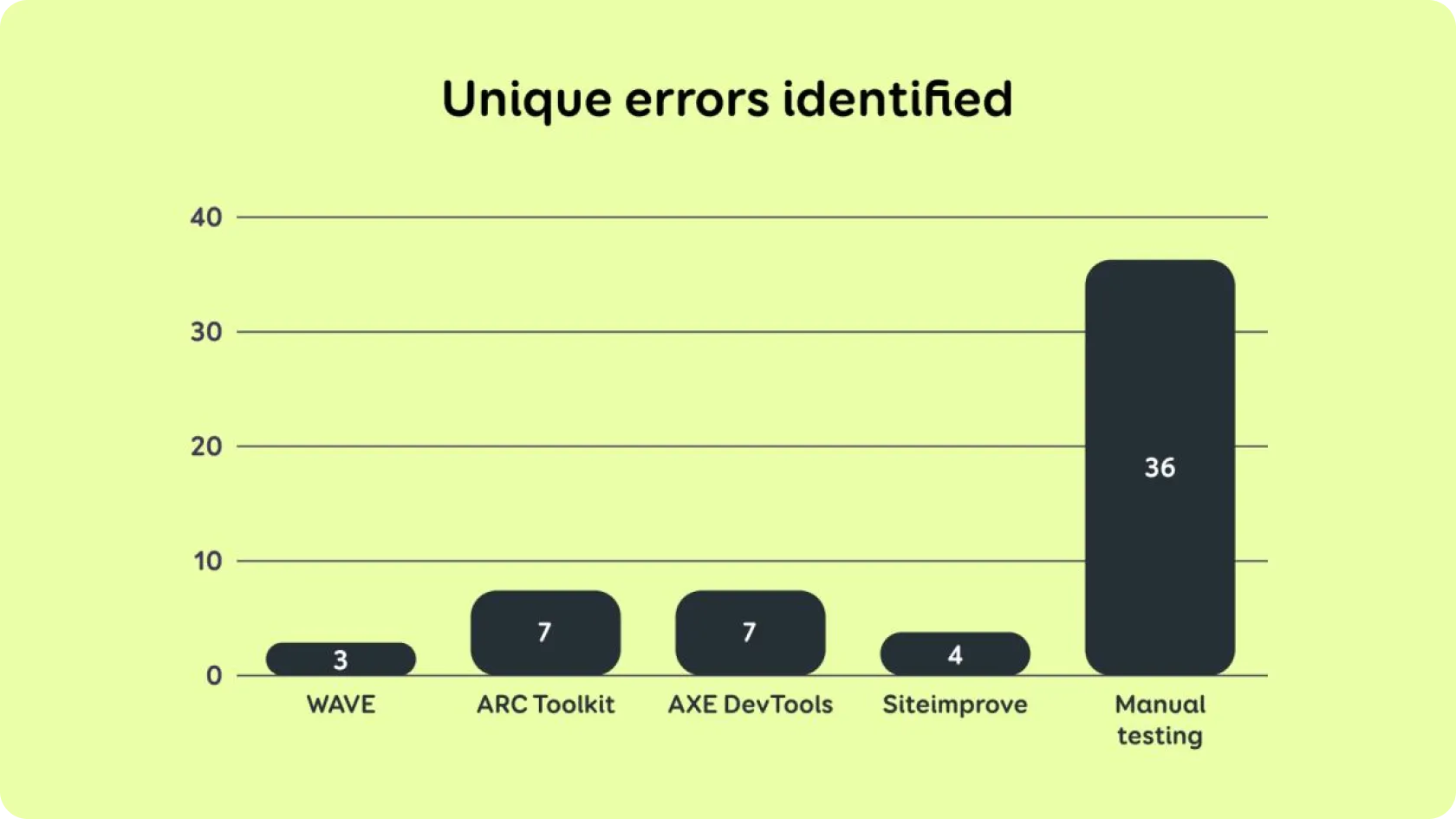
Figure 2: Unique errors.
Three out of four automated tests also reported findings that were not reported during manual testing. We have highlighted these findings together with reasons why they were not reported in manual testing.
This overview shows that some of the findings reported by automated tools are not actually errors that would significantly affect the user experience or accessibility. This confirms that blindly trusting the results of automated tests can lead to inefficient use of resources, shifting attention to issues that are not actually an obstacle for users.
Therefore, it is important that the results of automated tests are complemented by expert review and manual testing so that resources are spent on solving real accessibility issues.
To summarise
All of the automated accessibility testing tools used for testing were equally effectively and were able to identify an average of 15% of accessibility issues on the website being tested, missing the majority of important issues.
In our opinion, one of the reasons is that when using a website or application, the user performs various actions such as pressing buttons, entering text or enlarging the page. These actions trigger various changes on the page, such as opening modals, accordions, or notifications.
However, automated tools do not have the capacity to simulate all these activities or analyze the changes that occur due to them. However, if user behaviour and context are not taken into account, many accessibility problems are overlooked.
There may be automated tools on the market that can also detect slightly more accessibility errors than the tools mentioned in this article. Nevertheless, we believe that there is still a long way to go before automated tools can replace manual testing – this will not happen anytime soon.
Would you like to discuss your ideas?
Book a free 30-minute accessibility consultation

Kadi Rosenthal
Accessibility Specialist
We will help you identify your accessibility needs, establish a clear plan for training or an audit and provide a concise overview of your website’s accessibility.